CHI 2025 · First author
DesignWeaver
A workspace for turning vague product ideas into inspectable design dimensions, richer prompts, and better comparison across generated concepts.

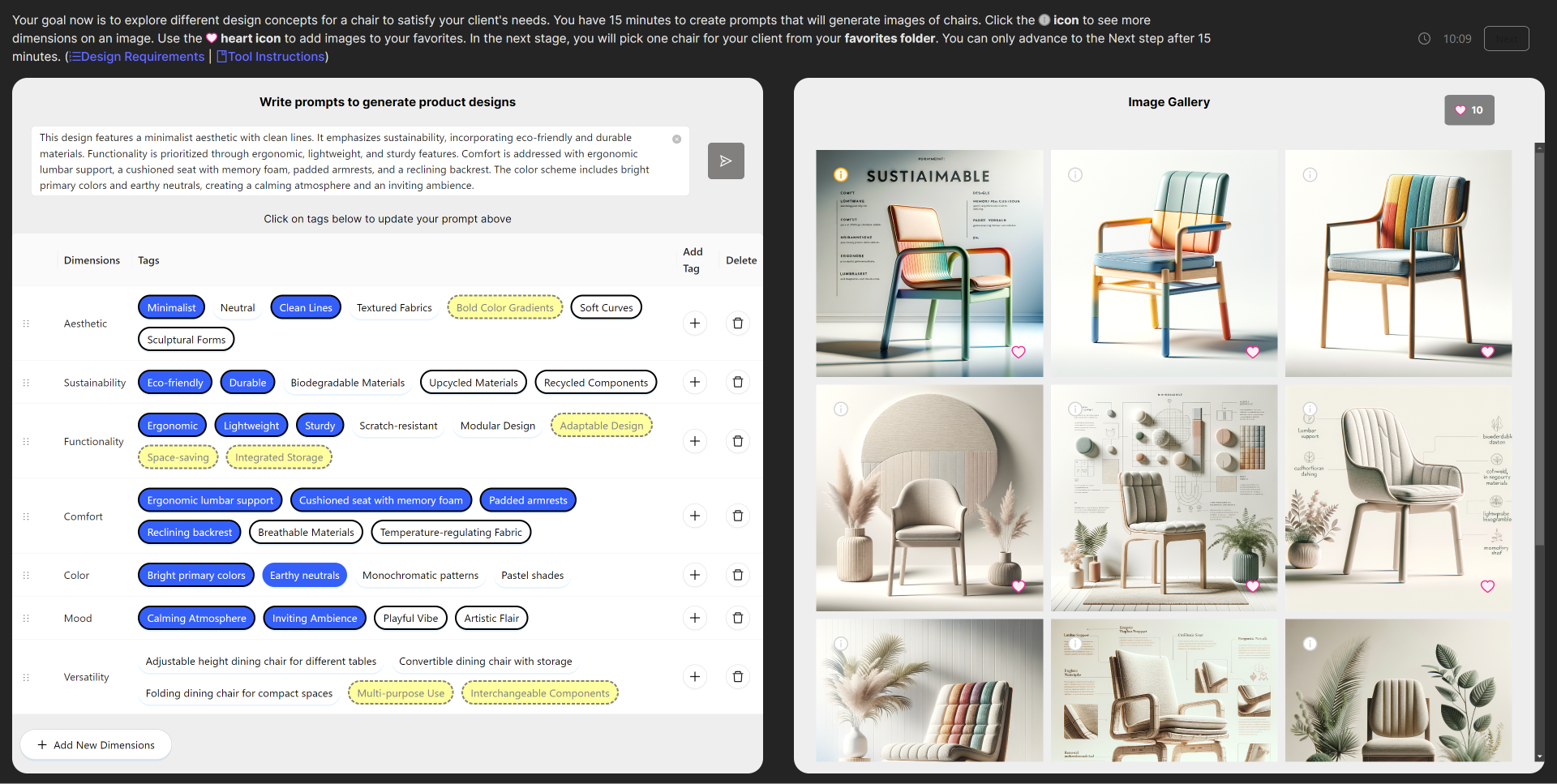
One screen in three parts: the design brief on the left, the tag-based prompt box in the middle, and the image gallery on the right.
Open original figure ↗Visual field: Paper Shaders' Static Mesh Gradient by Paper.
Question
How can an interface help novices see the design dimensions hidden inside prompts and generated images?
Novices know what they like when they see it, but a blank prompt box asks them to name it first. The study began from that gap.
Contribution
DesignWeaver makes comparison explicit by letting designers collect, revise, and reuse visual dimensions during iteration.
Dimensions come from the brief, from images people upload, and from what the model generates, so the vocabulary grows with the work.
Evidence
In a controlled study, participants wrote richer prompts and produced more diverse, expert-aligned chair concepts.
52 novice designers took part. With DesignWeaver their prompts were longer and more specific, and experts rated their chairs more novel than the baseline's.
What is DesignWeaver?
DesignWeaver is an interface for making prompt decisions visible. Instead of asking novices to invent the right design vocabulary from a blank text box, it surfaces dimensions such as style, material, ergonomics, and form from briefs, images, and generated concepts. In a controlled study (n = 52), participants wrote more nuanced prompts and produced more diverse, novel designs than with a standard text-only interface (Tao et al., 2025).

How DesignWeaver Works
- Upload Design Brief
Client persona, requirements, and moodboard go in; the system extracts three initial dimensions. - Build AI Prompt
Designers click tags or type text, then the prompt is formatted into a more complete design request. - Generate And Inspect Designs Designers compare three rendered images and use Info to surface new tags from the outputs.
- Iterate And Refine Designers add or remove dimensions, regenerate, and collect favorites for side-by-side comparison.

Key Features of DesignWeaver
- Dimension Palette
- Extracts dimensions (style, color, form) from an uploaded brief
- Lets users toggle tags (e.g., “minimalist,” “sustainable”) to build prompts
- Interactive Prompt Box
- Merges user text with activated tags
- Completes and reformats prompts via GPT-4
- Image Gallery & Feedback
- Generates three DALL-E 3 images per prompt
- Info buttons surface new tags from generated images via GPT-4o-mini
- Favorites support side-by-side comparison

DesignWeaver Implementation Details
- Frontend: React
- Backend: Python + Firebase / Firestore
- AI Models: GPT‑4o (prompting), DALL·E 3 (image generation), GPT‑4o‑mini (tag extraction)

DesignWeaver Research Results
A user study involving 52 novice designers revealed that DesignWeaver:
- Prompt Quality: Encouraged longer and more nuanced text prompts.
- Design Diversity: Led to the creation of more diverse and innovative images.
- Creative Exploration: Rated higher on creative exploration and continuous improvement of design ideas

DesignWeaver Impact & Conclusion
DesignWeaver bridges the gap between novice and expert design approaches by:
- Providing structured guidance in prompt engineering.
- Enabling a deeper exploration of design spaces through iterative feedback.
- Enhancing the overall quality and novelty of design outputs.


DesignWeaver participants created semantically more diverse images than the Baseline (Right).

Conclusion
DesignWeaver’s dimensional scaffolding bridges novice‑expert gaps by making domain vocabulary explicit and enabling rapid, structured exploration of design spaces—ultimately fostering more innovative, user‑aligned product concepts.
BibTeX
@inproceedings{tao2024designweaver,
  title = {DesignWeaver: Dimensional Scaffolding for Text-to-Image Product Design},
  author = {Tao, Sirui and Liang, Ivan and Peng, Cindy and Wang, Zhiqing and Palani, Srishti and Dow, Steven P.},
  booktitle = {Proceedings of the 2025 CHI Conference on Human Factors in Computing Systems},
  series = {CHI '25},
  pages = {1--26},
  publisher = {ACM},
  doi = {10.1145/3706598.3714211},
  arxiv = {2502.09867},
  month = {apr},
  year = {2025}
}